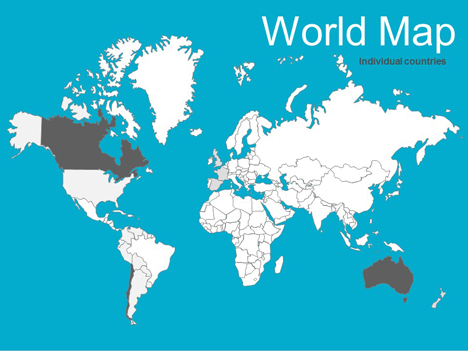
World Maps editable vector
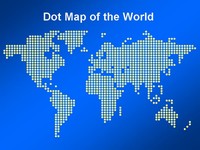
We have updated our free editable vector maps of the world, with most major countries included.
You can change the colours and lines to create interesting effects and designs.
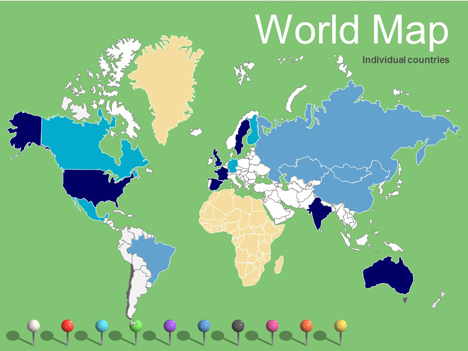
We have also included a vector outline if you just wanted to do a map of the world. You can even lay our nice pins across the top.
Please let us know if there is anything else that we need to change.
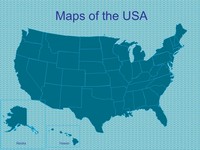
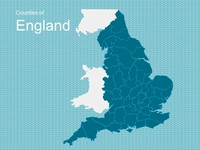
We also have larger editable maps of the UK and Europe along with Africa and North America.
If you have enjoyed using this template, please let us know in the comments box below, what you used it for.
If you liked this PowerPoint Template we would appreciate you liking it on FaceBook or Tweeting it.
Published On: 20th Nov 2011
Read more about -Editable Map PowerPoint Templates , Editor's pick, Geography, Maps, World Template number 00402
Recommended Pages
-
This map needed some names on the places….
-
WAY COOL!
-
Good point – it seems to have merged with Argentina.
I’ll get Jon to chnage it when he gets a chance.
-
Are there pushpins without the shadow? I like the shadow, but wanted pushpins also without. Thanks!
-
Willis
Good idea.
I’ll get Jon to take off the shadow.
-
wow, thats a good effort from you guys, solved my problems
-
I’ve having difficulty opening the file. The rest of the files on other pages of the site seem to open without any difficulty. Any chances the file has become corrupt or am I doing something wrong?
-
Also at a quick glance there is no Swaziland nor Lesotho.
-
Geeeeeeeenius! You realise there are people charging $250 for this sort of thing? I love you guys for making it free! I’m an impoverished student so if I hadn’t found this I’d have had many hours with felt tip pens and a scanner to look forward to…
-
OMG! This is wonderful! Thanks for making this resource free!
-
I would love to be able to use this ppt slide for my World Geo support class, these are low readers, but it doesn’t want to open for me because two of the frames are not showing up.
Can you tell me if there is another route into the slides? Thanks. The other world things you are are fabulous and I think you. Makes my job so much easeir. -
Chris
It seems to open fine. Perhaps you just need to try it on another machine.
-
when I downloaded this map, powerpoint couldn’t read it. the other maps opened just fine.
-
This map can’t be downloaded. I tried several times and it states it has an error. How can I get this powerpoint template?
-
I am also still having huge difficulty downloading. I tried advice of another machine. I could not download it, but I did get it to open and then tried to save it that way. No such luck. While it is an awesome prop, it doesn’t like to download. Thanks for the others though, I can’t wait to use the Europe maps with their flags like your example.
-
Thank you for this well-done free resource! I will definitely check back here again.
-
Hi guys I just tried again and had no problems downloading and opening the file. It has been saved in PowerPoint 2003 format.
It sounds like you have been opening it OK, but have problems downloading it. In your browser you can save it with File > Save As.
Any other problems and it may be better using the firefox browser.
-
this is just amazing. thank you for your work.
-
exactly what i needed! thanks so much!
-
An excellent resource.
-
We plan to work on the maps in the next couple of weeks.
Anybody else have any ideas of how they can be improved?
-
This map is great, thank you so much for it.
-
Hello,
Your map looks great. Please, could you tell if it needs a copyright or something?
Thanks,
Vi
-
Great maps!
-
this is awesome! just like pokemon!
-
Great Jobs man! Thanks alot! I’m from Indonesia an thats what i’ve been looking!
-
hi! can you make an accurate map of Philippines… thanks…
-
Thank you! This is wonderful design!!!
-
I really enjoy the work you’ve… It’s quite helpful for my classes 😉
-
I tried downloading the world map but the files are corrupted..=(
-
This is very cool, but Malawi & Thailand are not quite accurate – they are combining with other countries.
-
thank you
-
Thank you very much! You’ve done huge work. Finnaly I’ve found exactly what I needed.
-
Thanks. You said “tell us how you are using it”. I am preparing a presentation to show my boss how many hardware servers we have in the world and the different locations.
My point is that my budget is acceptable because there are so few servers in so many different countries that I have to use a lot of different vendors! And it costs more when I have to use that approach.
-
great work! thanks!
-
Absolutely brilliant!!!! Thanks!!!!
-
Thank you, it’s a cracker!!
-
Way to go. Very very good!
-
Hi!
Thank you so much!! =)
-
Thanks for the map, greatly appreciated. Will be used for a business presentation to open up students eyes to worldwide career possibilities !
-
Hi, this is amazing, thank you! How did you do it?
As you asked for improvement possibilities, I found that the Middle East/African Region could need an update. Several countries (especially the small ones) are missing or were merged with others:
– Israel
– Lebanon
– Qatar
– Bahrain
– Swasiland
– Lesotho
– Uganda, Rwanda, Burundi & Zambia are shown as 1 countryBest regards!
T -
I found another 2 missing countries: Kuwait and Malawi!
T -
Awesome Map.
Exactly what I needed.
I created missing countries by copying & editing points for a rough estimate. -
Thanks from teachers everywhere!!!!!
-
I noticed someone already posted that the Middle East and other areas still need work. Any idea when that might be accomplished.
-
This is awsome! I’ve looked everywhere for something like this.
-
I love this map, but I’ve found that the shadows of the push pins don’t print. Can anyone help?
-
thank you very much, this is super helpful 🙂
-
Wow – thanks guys, this’ll help me millions!
I’m going to use this in Excel in an VBA automated report to show where our revenue is coming from.
To do this I need to give each country a name that reflects what it is, so that I can change it’s colour via visual basic. I’ll try post the link back here if I remember.
Thanks again!
-
Great map, but some countries in Africa seem to have merged… can these be updated too?
-
this site is very helpful!
-
Angie
Do you know which African countries have been merged?
-
Lifesavers! Nice one. Couldn’t import from anything however I tried, so you’re map inside Powerpoint is a real boost. Many thanks for you time to get this converted, and the free download is brilliant. CHEERS. Thanks again.
-
I really, really appreciate your posting this file. Thanks so much.
-
Thanks a lot for the maps,
Could you make the map of China?Thank you once again
-
Excellent help. Danke
-
Guys – thank you so much for this, I just absolutely nailed a client report using your world map!
-
Hi – wondered if you have any regions map – am particularly interested in regions maps for bigger countries such as India, China etc?
Thanks for these though, they are fab!
-
It is very useful and great, I have seaching for that all day long, now I get it. Thanks for sharing.
-
can you please make a distinction between israel and jordan?? thanks!
-
It would be great to have a complete set of the world:
Asia
Africa
All Countries by Continent
All US States and Canadian Provinces -
Turkmenistan, Uzbekistan, Tajikistan, and Kyrgyzstan are missing. As are Azerbaijan, Armenia, and Georgia.
Thanks for a great service!
-
Please add Michigan and the great lakes to the world maps
-
[…] have maps of UK & Europe, also we have free editable PowerPoint maps of North America and now editable world maps. If you liked this template we would appreciate some feedback on how you would like to use it. […]
-
Excellent! I have been looking for this … Thanks.
-
do you have detailed map of India
-
Thank you for sharing. ia have been scrollind during nearly 2 hours to find exactly what i need. I will give you credit.
-
[…] have maps of UK & Europe, also we have free editable PowerPoint maps of North America and now editable world maps. If you liked this template we would appreciate some feedback on how you would like to use it. […]
-
How can you change the colors on the map/indivdual countries?
-
Save the file to your PC.
To change the colors of the countries.
Open it up and you should be able to edit it directly in Powerpoint.
-
You guys Rock!
-
great job! very useful!
-
hi guys, i like the map of the world with individual countries and loads of pins but when i try and put a pin on a country it goes beneath it (the country) and in dragging it out i usually manage to drag out several continents ats well!
it is a real nuisance. any tips? please try and answer sap.
thanks again
🙂 -
Select a Pin and then select
Draw > Order > Bring to Front
This shoudl make the pins on the top level.
The draw menu is normally located on the bottom left of the workspace.
-
Excellent template…thank u..keep up the good work..Cheers
-
Thank you for the world map. I want to draw time lines for immigrations to UK after 1st worldwar
it is realy good source you have for someone like me who need to provide information free information groups. -
This is really cool!!
I have a suggestion. I will be great if the map could display the name of the countries whichever is highlighted by color.
-
Thank you! Its simply great. Will use to create educational material on world history.
-
This is such a great idea! But I would like it if it were more detailed and if you could make separate continents. Oh and also you didn’t make Antarctica. But this is so cool, I’ve been looking for something like this for ages and all of them are like 300 dollars! But this is FREE! You’d be mad not to think this is a great idea!
-
I love the map, but there are no Uzbekistan, Tajikistan, Azerbaijan… Im preparing for a presentation for Central Asia countries…
-
Yea….east Malaysia and Indonesia are merged tgthr…?
-
Great resource..
Eritrea seems to be missing -
These templates are brilliant! Thanks.
I will use the Europe & World Templates for a Display for my job.Thank you.
-
[…] view our other world maps click here. We also have some business templates featuring world maps. Download as Power Point (PPT) […]
-
Very useful for my urbanism class! excellent!!!!
-
Thx for the great map.
As a manager of a large corporation, finding out if we have such map would have taken much longer.
My PPT is ready and looking rather fine. Presentation this Friday …
Again, thank you for the free map.
-
Thank you for saving my day!! I have a meeting on monday, and you saved working all over the week end by sharing the maps.
-
Very good, I like it.
-
Thanks a lot
very good 🙂but how can I enlarge it???
-
To enlarge just click on the object and pull the corner handle (normally a circle).
If there are multiple objects you will need to slect these and group them first.
-
I’m a italian teacher. Thanks!
-
I was looking for a vector graphic map of the world and this is perfect.
-
such a gr8 idea…u guys rock….
-
Thank you for providing the tools to get my job done. I made the mistake of wasting 20 minutes on the Microsoft template website looking for something like this, don’t know why I bothered.
My boss wanted me to color a world map before he left work today which gave me 2 hours. Now I am a savior, great website I will surely be passing it along to other admins. -
This is great thanks so much it was exactly what I was looking for for my geography final assignment. Its awesome!
-
I will use this for talk on my life and career at the “Career Encouragement Cafe” next week. I have been looking for something like this. Thanks!!!
-
You are missing countries: Lesotho, Swaziland, Equatorial Guinea, for example.
-
great keep it up
-
Excellent resource, thanks.
-
Thanks for a great collection !
-
Brilliant maps!!! Many thanks!
-
Can we use these maps to create an interactive flash map?
-
Wonderful! Thank you so much.
-
Hi guys, great resouce thanks for making it free. I need this exact principle, but with a close up on Middle East & North Africa (MENA. The scale means that some of the countries in this region are missing – Kuwait, Bahrain, Qatar for example.
-
Thanks for its free. I need maps of Indonesia. Thanks so much…
-
This is perfect! Ideal! Please keep me post it with your new desigs related to maps or related design products to maps templates.
Thanks again and good job. -
Thanks again. I will recommend your designs and products to friends.
Ernesto -
Amazing! So incredibly wonderfully helpful.
-
Wonderful – thank you very much 🙂
-
like others have mentioned, it would be very useful to have names for the countries – not on the map, but the drawing objects should be named after the country (now they are named “freeform xxx”) so that they can be selected easily with “select multiple objects” button
-
nice to have such a good map, thank u
-
Hi!
I downloaded the map and use it for a business presentation. I guess highlighting countries is the main use case for this template. I used it to highlight countries my company is currently selling a product to (and we are a very global business). It worked great, but I would like to share my feedback to make it even better:
– middle east: Countries as Israel and Lebanon are missing.
– central Asia: Even large countries as Uzbekistan or Turkmenistan are missing…
– South East Asia: Border between Malaysia and Indonesia is missing, region not a well made as the others.Thanks again for the great template!
Chris
-
Thank you for this! This is awesome! It took me forever to find a downloadable map that can be used for presentations and allows me to highlight world countries.
-
Incredible work! Been looking for something like this for years! Incredible for visual learners.
-
This is great! Thank you!
Any chance you could update it with Malawi/Rwanda/etc?
Thanks!
NL -
Could you make one with Kurdistan as a seperate nation.
for my presentaion.Great Job
thanks 🙂
-
Thanks from a happy grad student! I needed to illustrate the locations of various case studies for my written and oral reports, and the outline map of the world was perfect: I copied it into Visio and marked it up with that program’s drawing tools. Appreciate your making these maps available!
-
So cool, I really maps 😡 I haven’t used it so far in class but big thumbs up to you, great job!!!
-
thank you let me to using this
-
wonderful! thank you very much for this high-quality free resource.
-
this is amazing thanks 🙂
-
Thank you very much for this
-
Thank you very much, its just awesome
-
Excellent! Thanks a lot for making this available – big help!
Was wondering how you did the pins? I like the shaddow – especially that it keeps the underlying colour. How do you do that??? I’d like to do some shaddows of other ‘objects’ myself – but need some help on how this can be done.
Thanks. Ulrich -
Cooooool! Wow. This is a map file what I wanted. Thank U.
-
Great job! However, could you edit the countries so that they all have their individual borders?
E.g. look at Brazil and Colombia – missing lines. Furthermore, Chile is just a larger area underneath Argentina. I would need just Chile’s outline for example.
Thanks!
-
Thanks very much — I’ll use them in company presentations. Love the drawing pins!
-
woohoo!!!!!!!!!!!!!!!!!!!!!!!! You just saved me (my client) $30. My client is a penny pincher so this will put them over the moon.
-
Thanks very much 🙂
-
Excellent!! THANKS!
(Cambodia and Laos are treated as one country) -
U just saved my life (or my job at least:)!
-
LOVE
-
Superb, easy to use. I felt like I was playing the board game risk!
-
Perfect. Was looking for this (free) option for a long time. Working in development (HIV & AIDS) and this is so useful to show where communities progress etc.
-
Hi this is a great idea for the maps, but could you include the Isle of Man and the Channel Islands in the UK and Europe Maps
-
THESE ARE AMAZING!! THANK YOU! I’m a teacher and you have no idea how much these have helped me so far this year! 🙂
-
Maps are editable and looks good. Great Work. Thanks for this support.
-
Fantastically useful!
Malawi and Tanzania have merged together, and would really appreciate the polar regions being put in,
Many thanks!
-
any push pins without the shadows?
-
smashing website !!!!!!
helped me make a snazzy presentation !!
great -
You would have to export the image to Paint or Photoshop to remove the shadow and then return it to PowerPoint
-
hi,
Im trying to download the editable world map but havent been able to find the right link for the free download. Can you direct me to the relevant link please?
Thanks much!
-
There is a blue “download as PowerPoint (PPT) file button you need to click on that will allow you to download the content
-
Thanks for your efforts.
-
In this map, Bolivia has the Pacific coast!!!!
-
it is very nice map. but if u mentionsed by Name all the countrys better than these…..
-
Thanks for the feedback, we are working on our maps – a lot of them are now available as a separate powerpoint download which includes the country names.
-
thank you sooooo much i needed a map like this for my geography work. you have been a big big help and i cant thank you enough :):):):):):)
ly xxxxxxxxxxxx -
I will be using this for a masters degree presentation. This is very good work.
-
Great map,
I’d like to use it for my new presentation for my new company. A free map is really helping me with my low budget start.Thank you
-
This was ALMOST exactly what I needed. Is there any way that you could update Yugoslavia? It’s separated into 6 countries now.
-
Thanks Matt, we are always looking for new ways to improve our templates and will try and update this in the future.
-
Thanks for this very helpful – is there plans for more detiled oultines – Bhutan, Tajikistan (and the other stans) and some african countries (Malawi)?
-
You have the entire former Yugoslavia as one country: it is now 6 countries: Serbia, Montenegro, Kosovo, Macedonia, Croatia, Bosnia & Hergovina.
Thanks!
-
Used this for a presentation to show location of customers.
Thanks for your efforts! -
We have now been able to add changes to the maps;
1) Bolivia is now a landlocked country
2) We have changed Yugoslavia to Bosnia & Herzegovina, Albania, Macedonia, Montenegro and Kosovo.Thanks for all the feedback, we continue to try and improve our maps.
-
we have now added;
Bhutan, Laos and Cambodia
thanks for all your feedback, please feel free to add comments to help us improve our templates. -
This is really good.
Thank u guys. -
Hi,thanks for your amazing website.
Would you please provide me Iraq and Jordan vector map,
Thanks. -
Great world map – I’ve been looking for one of these for ages.
A couple of probs: Azerbaijan and Georgia are missing, and I think Turkey has slid a little way towards the West …. !! -
Fantastic just what I was looking for. Will be using it in church. Am from Canada.
-
Thank you guys for ppt template, but there is no Uzbekistan border, you merged it with other central asian countries such Kazakhstan, Tajikistan and etc.
-
Do you have any maps of just Asia Pacific?
-
Hi guys, I have been looking for something like this for quite a while. In my job I am focused just on the Asia Pacific, Greater China, and India area. It would be great to get a slide pack that just features this region so we can get a bigger view of each country.
-
love website
-
Great map! Thanks for sharing it. I want to use it for management updates, e.g. to indicate country specific information on legislation, using different colours per country.
For this purpose it would be easy to have EU as a group (as legislation is the same for all states) > makes it easier to change colour all at once.
I already did it by hand but of course it is easier when preset.
kind regards,
Hans -
One more comment.
I always see on maps that Alaska proceeds a bit more to the south, on a strip of land along the Canadian coast.
Maybe for your next update… -
Great template. Thanks.
The world map is terrific and easy to use.
-
I am having trouble merging a couple of different slides from different template packs together. The colors change for some reason. For instance the background of the first map changed to purple instead of blue when i merged it with another powerpoint. How can I fix this?
-
Hi, sounds like this is the colour theme of the presentation you imported the maps into. In order to keep ours with the same background we go to slide master which can be found on View> slide master and then either you add the design to every slide by putting the background into slide one – or put it on a certain slide than cann be added by exiting the slide master and going to the drop down menu on “new slide”
What also might be affecting it is the colour themes which can be found by going to design> colours and then “create new colour theme” try playing around with this to change the main background colour and text colour of all the slides.
-
Thanks mate. This was grate staff. Thanks for your hard work!
-
Thanks for the free graphics! I couldn’t find them anywhere else for free; other websites charge large fees and you guys made it free! It’s just amazing and can’t say enough great things about you all!
Thank you, thank you, thank you!
-
thank you very much
I love it -
These maps have been a great help and are really straight forward to use! Really brought my presentations to life! Thanks so much!
-
Just what I need – thank you! I’ll use it in a presentation introducing my company. Its a simple but powerful way to show which countries we work in. I’ll have to Google some of them though- maybe an ‘idiots guide to the world’ would help?
-
Thank you so much for giving these templates to the world 🙂
-
thank you for offering pretty templates for free
-
Thank you for this gift!
-
Thank you for offering the maps.
There are a few countries/territories missing, however:
East Timor
South Sudan
Gaza/West Bank
Lesotho
Swaziland
And someone earlier mentioned that the states which were the former Yugoslavia need to be included. -
Thank you very much! This would greatly help me in my work.
-
Wow, this is what I looking for.
Thank you!! 🙂 -
The PPT version was excellent and was very useful for our purpose: Showing airspace mandates around the globe in the next 10 years. It is accurate enough for our application (briefing charts). Nice job!!!
-
This looks so cool, cant wait to try it out. I’m going to use this to teach my students 🙂
-
I work as a consultant for UNICEF, this has been really useful for an internal training to UNICEF Staff in Latin America. thanks!
-
I’m using it in my music classroom. Thanks so much for making it interactive! What a huge help!
-
The world map appears to be missing Uzbekistan and Turkmenistan.
-
It would be nice to have one slide with the country name on the map. When we are adding the stats, sometimes we have to check other maps to make sure that we got the right country. 🙂
-
South Sudan is in the news, but not on your map. It became a country in 2011 . . .
-
Thanks!!!!!!!!! so good!!!!!
-
Hi,
Your map is very good. I appreciate it being free.
A couple of suggestions:
Draw a boundary line to distinguish between the Malaysian and Indonesian sides of Borneo
Make Singapore, Bahrain and Qatar distinguishable on the map
Make the pins available without the shadows
Incorporate the major oceans and seas as editable components of the map
Thanks!
-
Thanks a lot. Great job!
-
Dear Friends
Thanks a lot for very beautiful and user friendly PPT
I wish success for you -
Thank you so much!!!!
-
Thank you for sharing this 🙂
-
If have other south america countries’ ppt template,that would be appreciated.
-
Hi there
I need a map of Middle East Africa. Please help. Which is editable on Powerpoint.
-
4.5/5!
It is a really nice powerpoint, was able to edit perfectly with it. There is one thing though, you forgot Michigan, United States. You know, the mitten? Anyway, great work and great powerpoint. -
Why is Antarctica missing? Not useful then to any scientific organization. Bummer.
-
Do you have an editable world map that shows the world prior to WWI?
-
this is just so perfect….. thanks a ton !!! really appreciated..!!!!
All the very best and keep up the good work….
-
Great maps! Many thanks for sharing and all the effort you put in to this! It will be great in my daughter’s presentation in school.
-
Bless you guys for the ease of comfort you have added to my working experience.
-
This is great ppt. Thanks on effort.
But, about Former Yougoslavia countries:
You didn’t draw Serbia as one country. You divided it and separate Vojvodina and Kosovo, which are still parts of Serbia.
Kosovo, though, declared independence, but it’s still not internationally recognised (Serbia didn’t recognise it too) and is not a member of UN. -
Great, but please note there is a north and south Sudan now – so need to divide that big country up here too.
-
Great tool. Using to identify location of specific populations. (Sri Lanka seems to be misplaced).
-
Looks like the border for South Sudan has not been added to your world map.
Thank you for providing these maps.
-Joe
-
This has been great! Eastern Europe seems to be missing Uzbekistan, Tajikistan, Turkmenistan, and Kyrgyzstan. Can this be fixed?
Thanks!
-
good map
-
Thank you for sharing this great map, but please include Uzbekistan, Turkmenistan, Kyrgyzstan, Tajikistan
-
Please move Sri Lanka a little ways to the right. And please free up Uganda and surrounding tiny countries from a single cluster.
-
This is the best templates I’ve seen.
Thank you very much for the share. -
Hi, this is a great template! Thanks for letting everyone use it for free. I have one very important question: what scale/ benchmark is this map?
thanks in advance!
-
it’s wonderful, man… you are a kind person
-
Beautiful, hope it works, I’ve not installed pp atm.
-
I love this map and have been able to change colors and borders of countries. Terrific.
Can I add a single slide on a website so folks in these countries can link with the right office for assistance?
Thanks -
Thank you so much for this. Just save me and my team like a week of work for our diversity project! Awesome work!!
-
this is great , thank you 🙂 🙂 🙂
-
For a small non-profit with a global remit, this is just a fantastic resource. Thanks so much. I love it.
-
Why is Vojvodina presented split from Serbia (on the north)? It is the same country and if you want to present regions, than it should be done for other countries as well.
-
Great work! this really helped me out.
One finding for improvement: Uganda, Rwanda, Burundi and Zambia are merged into one. -
Excellent work, many thanks. Very helpful
-
SOUTH SUDAN is missing
-
India map is wrong in North. Jammu & Kashmir is merged in China and Pakistan, which not the actual case.
-
Thank you ^^
-
I’m missing Antartica from the map? Would be a nice addition! Thanks!
-
On Indian part Whole kashmir was cut off and merged with China
- Abstract
- Animal
- Animated
- Architecture
- Birthday
- Business
- Calendar
- Celebration
- Christmas
- Clip Art
- Maps
- Educational
- Engineering
- Flags
- Food and Drink
- Landmarks
- Medical
- Nature
- Pattern
- Science
- Shape
- Sport
- Transport
- Travel
- Valentines
- Weather
- Wedding
- Subtle Waves Template
- Business world map
- Filmstrip with Countdown
- Business 1
- Blue Bubbles
- Corporate 2
- Vector flowers template
- Filmstrip
- Editable PowerPoint newspapers
- Hands Template
- Red blood cells slide
- Circles Template on white
- Maps of America
- Light Streaks Business Template
- Zen stones template
- Heartbeat Template
- Web icons template
- Chalkboard