Microsoft singles out primary school for innovative use of PowerPoint.
Osbaston School is in many ways like many other suburban primary schools. But unlike other schools, Osbaston has been singled out by Microsoft for the innovative way in which it uses PowerPoint.
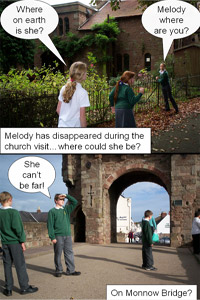
Osbaston encourages its Year 6 pupils to learn and use PowerPoint to help do their project work. But the use of PowerPoint that stands out is the soap opera comic that the school creates each week.
It is called South-Eastenders and is based loosely around the BBC soap opera Eastenders. “We called it South-Eastenders as we are based in the South East of Wales,” explains class teacher Steve King.
The Year 6 pupils create the presentation which is updated every week. It gives the children the opportunity to carry out storyboarding and sequencing. Each episode is quite short and consists of 3 or 4 frames on the storyboard. The children then use a digital camera to source the pictures.
Each episode usually ends with a cliff-hanger. Every Friday the presentation is then printed out and pinned onto the wall on the way into the school. It is also loaded up onto the school website. They are now up to around 11 or 12 episodes.
“As well as being a fun thing to do, we can use the presentation to tie in some serious issues,” explains Steve King, “such as tieing in with an issue around bullying, or how a new girl could be feeling.”
The school’s use of PowerPoint has been liked not just by the children but has caught the attention of Microsoft Corporation. The school was chosen by Microsoft to represent Wales at the Microsoft Worldwide Innovative Teachers Forum in Philadelphia. This gathered together 150 teachers from 53 countries.

Philadelphia was chosen as the venue for the conference as this is the location of the “School of the Future” – a school that does not have books and uses computers extensively in the classroom.
The UK government has invested a lot of money into education and in particular into information technology. Most schools now have an interactive whiteboard in each classroom, but in many cases it sits idle. “In many schools they call it the magic board, because the mouse can follow your finger on the screen, but they are not being used seriously,” explains Steve King, Deputy Headmaster and Year 6 teacher.
Microsoft is investing heavily in education, trying to bring in new users to head off competition from free open-source alternatives such as OpenOffice (www.openoffice.org). This has created tension with Microsoft ever since the UK government’s ICT agency recommended that primary schools could reduce computer costs by nearly half if they stopped buying products from vendors such as Microsoft and switched to open source alternatives.
-
its wonderful
-
it’s awsome
-
it is awsome
-
fantastic
-
simply marvellous
-
i would like to download it but how?
-
i want to download it but i dont know how?
-
its brill but anyone who has powerpoint please tell me how to download it from the internet
-
really good
-
that is aweeeeeeeeeeeeeeeeeeeeeeeeeeeeeeeesome
-
i like this pp very much
-
very usefull
-
i like it
-
its fukin kool bt hw u dwnlodin it plz i need it as sonn as bossiple
-
It saved my school presentation.
-
it is fantastic
-
good now let me download it plz
-
free
-
i think powerpoint is good
-
Great!!!!!!!
-
good and also brill